Embedding Providers Guide
MDDB supports multiple embedding providers for vector search functionality. You can configure embeddings either through environment variables or via the Admin Panel UI.
Zero configuration: a local model is found automatically #
If no embedding provider is configured, MDDB asks localhost:11434 once at
startup whether Ollama is running with an embedding model pulled. If one is,
it is used:
vector search enabled  source=autodetected provider=ollama
                       model=nomic-embed-text:latest dimensions=768
This is discovery, not a model in the binary. It exists because the common shape of "this install has no semantic search" turned out not to be "there is no model on this machine" — it was that MDDB never looked.
What it will and will not pick. Ollama's /api/tags reports model names
but not embedding dimensions, and a wrong dimension writes vectors that no
later query can match. So only models whose dimensionality is known are
selected, in this order:
| Model | Dimensions |
|---|---|
nomic-embed-text |
768 |
mxbai-embed-large |
1024 |
snowflake-arctic-embed |
1024 |
bge-m3 |
1024 |
all-minilm |
384 |
Preference order beats installation order — a machine with both all-minilm
and nomic-embed-text gets the better one. An Ollama holding only chat models
is left alone: a chat model would produce vectors that are not embeddings.
Anything not on this list is left for you to configure explicitly, because
guessing its size is worse than not configuring it.
Precedence. Stored configuration wins, then MDDB_EMBEDDING_PROVIDER, then
autodetection. It never overrides a choice you made.
Turning it off. MDDB_EMBEDDING_AUTODETECT=0 skips the probe entirely.
OLLAMA_HOST points it elsewhere (with or without a scheme). The probe has a
two-second budget and a refused connection answers in microseconds, so a
machine with nothing on the port pays nothing for being asked.
GET /config reports vectorConfig.source as autodetected, so the panel
shows a configuration nobody remembers writing for what it is.
Supported Providers #
1. OpenAI #
API URL: https://api.openai.com/v1
Authentication: API Key required
Documentation: https://platform.openai.com/docs/guides/embeddings
Popular Models
| Model | Dimensions | Use Case | Cost |
|---|---|---|---|
text-embedding-3-small |
1536 | Fast, cost-effective, general purpose | $ |
text-embedding-3-large |
3072 | Highest quality, best performance | $$$ |
text-embedding-ada-002 |
1536 | Legacy model (v2) | $$ |
Environment Variables
export MDDB_EMBEDDING_PROVIDER=openai
export MDDB_EMBEDDING_API_KEY=sk-...
export MDDB_EMBEDDING_MODEL=text-embedding-3-small
export MDDB_EMBEDDING_DIMENSIONS=1536
2. Cohere #
API URL: https://api.cohere.ai/v1
Authentication: API Key required
Documentation: https://docs.cohere.com/docs/embeddings
Popular Models
| Model | Dimensions | Use Case | Languages |
|---|---|---|---|
embed-english-v3.0 |
1024 | English text | English only |
embed-multilingual-v3.0 |
1024 | Multilingual support | 100+ languages |
embed-english-light-v3.0 |
384 | Fast, smaller embeddings | English only |
embed-multilingual-light-v3.0 |
384 | Fast, smaller, multilingual | 100+ languages |
Features
- ✅ Best multilingual support
- ✅ Semantic search optimized
- ✅ Built-in compression options
Environment Variables
export MDDB_EMBEDDING_PROVIDER=cohere
export MDDB_EMBEDDING_API_KEY=cohere_api_key...
export MDDB_EMBEDDING_MODEL=embed-english-v3.0
export MDDB_EMBEDDING_DIMENSIONS=1024
3. Voyage AI #
API URL: https://api.voyageai.com/v1
Authentication: API Key required
Documentation: https://docs.voyageai.com/
Popular Models
| Model | Dimensions | Use Case | Specialty |
|---|---|---|---|
voyage-3 |
1024 | Latest, best quality | General purpose |
voyage-large-2 |
1536 | High accuracy | Long documents |
voyage-code-2 |
1536 | Code embeddings | Programming code |
voyage-law-2 |
1024 | Legal documents | Legal text |
Features
- ✅ Specialized in embeddings (not general LLM)
- ✅ Very high quality
- ✅ Domain-specific models (code, law)
- ✅ Competitive pricing
Environment Variables
export MDDB_EMBEDDING_PROVIDER=voyage
export MDDB_EMBEDDING_API_KEY=pa-...
export MDDB_EMBEDDING_MODEL=voyage-3
export MDDB_EMBEDDING_DIMENSIONS=1024
4. Ollama (Local) #
API URL: http://localhost:11434 (default)
Authentication: None (local server)
Documentation: https://ollama.ai/
Popular Models
| Model | Dimensions | Size | Quality |
|---|---|---|---|
nomic-embed-text |
768 | ~275MB | Good, fast |
mxbai-embed-large |
1024 | ~670MB | Better quality |
all-minilm |
384 | ~45MB | Small, very fast |
snowflake-arctic-embed |
1024 | ~669MB | High quality |
Features
- ✅ Fully local, no API costs
- ✅ Privacy-focused
- ✅ Works offline
- ✅ Multiple open-source models
Setup
- Install Ollama: https://ollama.ai/download
- Pull model:
ollama pull nomic-embed-text - Run server:
ollama serve(usually auto-starts)
Environment Variables
export MDDB_EMBEDDING_PROVIDER=ollama
export MDDB_EMBEDDING_API_URL=http://localhost:11434
export MDDB_EMBEDDING_MODEL=nomic-embed-text
export MDDB_EMBEDDING_DIMENSIONS=768
5. Lexical (no model, no network) #
This provider does not understand meaning. Its vectors are hashed words and word fragments. Two texts are close when they share spelling: "car" and "automobile" are as far apart as any two unrelated words. It does not replace a model and must not be described as if it did.
GET /configmarks it as such (seevectorConfigin config), and the search advisor recommends keyword search for its collections.
API URL: none — nothing is called
Authentication: none
Model name reported: lexical-ngram-v1
What it does
Every word, and every character n-gram of length 3 to 5 of the word wrapped
in boundary markers (<deploy> gives <de, dep, epl, …), is hashed into
one of D dimensions. A second hash gives the sign, so collisions cancel out
on average. Weights are 1 + ln(count), so a repeated word does not drown
the rest, and each vector is L2-normalised. Pure Go, no download, no GPU. The
same text gives the same vector on every machine and every run.
The n-grams give typo tolerance: replicaton still lands near replication.
That is the only ranking gain to expect, and on the documentation set below
it was too small to measure reliably.
Environment Variables
export MDDB_EMBEDDING_PROVIDER=lexical
export MDDB_EMBEDDING_DIMENSIONS=512   # 256–2048, default 512; values outside are clamped
It is never chosen automatically. Precedence is unchanged: a stored
configuration, then MDDB_EMBEDDING_PROVIDER, then Ollama autodetection —
and autodetection only ever picks a model. To use lexical you name it. In a
stored configuration (POST /v1/embedding-configs) use "provider": "lexical"; model is required by the endpoint but ignored, and
dimensions is clamped to 256–2048.
Measured: MDDB docs evaluation set
The 20 questions of
tools/bench/evalsets/docs.json
against the 60 pages of docs/, keyed by file name, measured 2026-10-29 on
a server built from this release. The method is the one in
BENCHMARK; hybrid
is the default fusion (alpha 0.5).
MDDB_EMBEDDING_PROVIDER=lexical mddbd &
# load docs/*.md into collection "docs", key = file name, then:
mddb-cli eval docs --queries tools/bench/evalsets/docs.json \
  --config fts/bm25 --config vector --config hybrid
| Configuration | recall@10 | nDCG@10 | MRR | p50 ms |
|---|---|---|---|---|
| fts/bm25 | 0.825 | 0.719 | 0.698 | 0.8 |
| vector, lexical 512 | 0.775 | 0.649 | 0.644 | 1.2 |
| hybrid, lexical 512 | 0.875 | 0.726 | 0.686 | 1.4 |
| hybrid, lexical 256 | 0.900 | 0.724 | 0.681 | 1.2 |
| hybrid, lexical 2048 | 0.825 | 0.715 | 0.682 | 2.1 |
vector, nomic-embed-text (Ollama) |
0.875 | 0.758 | 0.750 | 12.0 |
hybrid, nomic-embed-text (Ollama) |
0.875 | 0.782 | 0.764 | 1.5 |
- Lexical vectors alone rank worse than BM25. They measure the same thing — shared words — with less precision.
- Hybrid with lexical vectors finds one more answer in twenty and ranks no better. nDCG moves by 0.007 and MRR drops. On a twenty-query set one query is noise, so this is not a measured gain. More dimensions did not help.
- A model is a different thing.
nomic-embed-textlifts nDCG by 0.06 and MRR by 0.07 over BM25, because it matches questions to pages that use other words.
So the search advisor recommends fts (bm25) for a collection with lexical
vectors and says why. A collection with its own evaluation set is measured
instead, and hybrid wins the advice there only if it scores better.
When lexical makes sense — and when it does not
| Makes sense | Does not |
|---|---|
CI and tests that must run vector, hybrid, cross-collection, retrievalMode: graph, MMR, quantization or HNSW without a network |
Finding documents that answer a question in different words — use a model |
| Air-gapped or very small installs where no model can run, and the vector pipeline still has to work | Improving ranking over BM25 — the measurement above shows no gain |
| Demos and laptops without Ollama | Multilingual matching — words in two languages share no spelling |
| Reproducible vectors: the same on every machine, replica and run | Classification by meaning (zero-shot labels) — labels match by spelling only |
| Typo-tolerant lookups of names and identifiers | Any place a reader would assume the search understands the query |
Switching from lexical to a model later is the same as any provider
change: the vectors are not comparable, so re-embed every collection with
POST /v1/vector-reindex and "force": true.
Images #
Image documents (see SEARCH) are always found by their alt text and captions. Their pictures are embedded only by a provider whose API takes images, into the same space as text embedded by the same model, so a text query can find a picture with no words on it. Checked against each provider's API reference on 2026-10-29:
| Provider | Embeds images | How MDDB calls it | Text query into the image space | Source |
|---|---|---|---|---|
| Voyage | Yes, with a voyage-multimodal-* model: voyage-multimodal-3.5 by default, the text model itself when it is multimodal, or MDDB_EMBEDDING_IMAGE_MODEL |
POST /v1/multimodalembeddings, one image_base64 data URI per input, input_type document/query. PNG, JPEG, WebP, GIF; ≤ 16 Mpx, ≤ 20 MB |
The same multimodal model, type: text |
Multimodal embeddings API, guide |
| Cohere | Yes, Embed v3.0 and newer (embed-english-v3.0, embed-multilingual-v3.0, the light variants, embed-v4.0) |
POST /v1/embed with input_type: image and images: [data URI]. JPEG, PNG, WebP, GIF; v3 models one image ≤ 5 MB per call |
Embed itself: Cohere's text and images share one space |
Embed (v1), Embed (v2) |
| OpenAI | No | — | — | The embeddings API takes a string, strings or token arrays; no image input is documented. (The page refused an automated fetch; checked through its published reference and SDK types.) |
| Ollama | No | — | — | /api/embed takes input text only; no image field |
| Lexical | No | — | — | It hashes words |
Not checked against a live API in CI (no keys there): the request shapes
above are tested against recorded-format test servers, and
TestImages_MultimodalProviderE2E runs the whole path against a real one
when MDDB_TEST_MULTIMODAL_PROVIDER (voyage or cohere) and
MDDB_TEST_MULTIMODAL_API_KEY are set.
export MDDB_EMBEDDING_PROVIDER=voyage
export MDDB_EMBEDDING_MODEL=voyage-3                       # text chunks
export MDDB_EMBEDDING_IMAGE_MODEL=voyage-multimodal-3.5    # pictures (default)
# MDDB_EMBEDDING_IMAGE_MODEL=none embeds no pictures, with Voyage or Cohere
Each picture is one provider call against the collection's embedding budget, its tokens estimated as one per 560 pixels. An unchanged picture is not embedded again.
Configuration Methods #
Method 1: Environment Variables (Legacy) #
Set environment variables before starting mddbd:
export MDDB_EMBEDDING_PROVIDER=openai
export MDDB_EMBEDDING_API_KEY=sk-...
export MDDB_EMBEDDING_MODEL=text-embedding-3-small
export MDDB_EMBEDDING_DIMENSIONS=1536

./mddbd
Method 2: Admin Panel (Recommended) #
-
Open mddb-panel:
http://localhost:11024 -
Navigate to Administration → Embedding Models
-
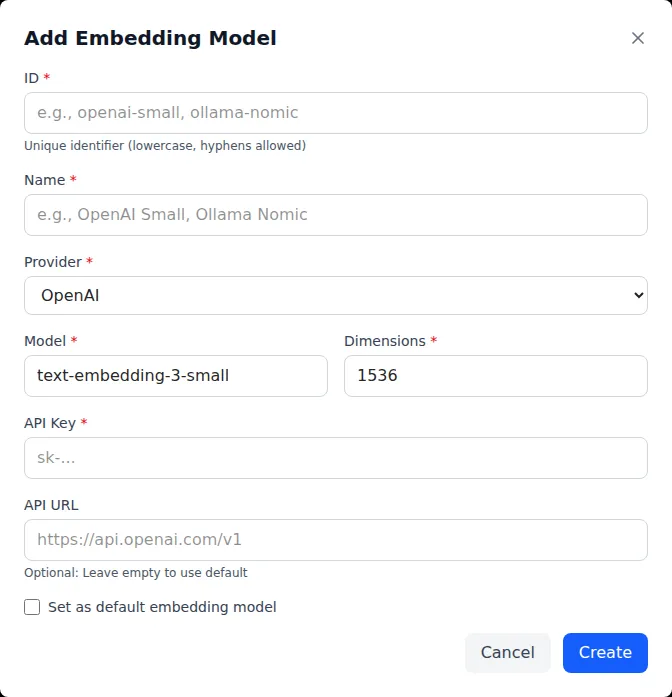
Click Add Model
-
Fill in configuration:
- ID: Unique identifier (e.g.,
openai-small,cohere-multilingual) - Name: Display name (e.g.,
OpenAI Small,Cohere Multilingual) - Provider: Select from dropdown
- Model: Model name
- Dimensions: Vector dimensions
- API Key: Your API key (for OpenAI, Cohere, Voyage)
- API URL: Custom URL or leave empty for default
- Set as default: Check to make this the active model
- ID: Unique identifier (e.g.,
-
Click Create
Import Current Config #
If you're using environment variables and want to migrate to database config:
- Open Administration → Embedding Models
- If no configs exist, you'll see "Import Current Configuration"
- Click Import Current Config to save your env var config to the database
Comparison Matrix #
| Provider | Cost | Quality | Speed | Multilingual | Local | API Key Required | Images |
|---|---|---|---|---|---|---|---|
| OpenAI | $$ | Excellent | Fast | Good | No | Yes | No |
| Cohere | $$ | Excellent | Fast | Best | No | Yes | Yes (v3+) |
| Voyage | $$ | Excellent | Fast | Good | No | Yes | Yes (multimodal model) |
| Ollama | Free | Good | Fastest | Fair | Yes | No | No |
| Lexical | Free | Spelling only, no meaning | Fastest | No | Yes | No | No |
Choosing a Provider #
Use OpenAI if: #
- ✅ You want the most popular, well-supported option
- ✅ You're already using OpenAI for other services
- ✅ You need reliable, high-quality embeddings
- ✅ English is your primary language
Use Cohere if: #
- ✅ You need best-in-class multilingual support (100+ languages)
- ✅ You're working with non-English content
- ✅ You want semantic search optimized embeddings
- ✅ You need smaller models (light versions)
Use Voyage AI if: #
- ✅ You want specialized, domain-specific models (code, law)
- ✅ You need the highest quality embeddings
- ✅ You're working with technical or legal documents
- ✅ You value a company focused solely on embeddings
Use Ollama if: #
- ✅ You want 100% free, no API costs
- ✅ Privacy is critical (data never leaves your server)
- ✅ You need to work offline
- ✅ You have sufficient local compute resources
- ✅ You prefer open-source solutions
Use Lexical if: #
- ✅ CI, tests or an air-gapped install need the vector pipeline to work with no model
- ✅ You need identical vectors on every machine
- ❌ Not to find documents by meaning, and not to improve ranking over BM25
API Pricing (Approximate) #
| Provider | Model | Price per 1M tokens |
|---|---|---|
| OpenAI | text-embedding-3-small | $0.02 |
| OpenAI | text-embedding-3-large | $0.13 |
| Cohere | embed-english-v3.0 | $0.10 |
| Cohere | embed-multilingual-v3.0 | $0.10 |
| Voyage | voyage-3 | $0.10 |
| Voyage | voyage-large-2 | $0.12 |
| Ollama | any model | FREE |
Prices as of 2026-03. Check provider websites for current pricing.
Best Practices #
1. Choose Consistent Dimensions #
- Once you embed documents with a specific dimension, stick with it
- Changing dimensions requires re-embedding all documents
- Higher dimensions = better quality but slower search
2. Monitor Costs #
- Track API usage via provider dashboards
- Consider caching embeddings for frequently accessed documents
- Use smaller models for development/testing
3. Test Before Production #
- Compare quality across providers with your specific data
- Measure search relevance for your use case
- Benchmark performance (speed vs quality)
4. Security #
- Never commit API keys to git
- Use environment variables or secure secret management
- Rotate API keys regularly
5. Switching Providers #
- Database configs allow easy switching between models
- Test new provider with subset of data first
- Re-embed all documents when switching providers
Troubleshooting #
"No active embedding configuration" #
- Set environment variables OR configure in Admin Panel
- Ensure API key is valid and has credits
- Check server logs for detailed error messages
"Dimensions mismatch" #
- All documents in a collection must use same dimensions
- Clear existing embeddings before switching models
- Consider creating new collection for different model
"API rate limit exceeded" #
- Slow down embedding worker (reduce batch size)
- Upgrade API plan with provider
- Consider switching to local Ollama
Ollama connection failed #
- Ensure Ollama is running:
ollama serve - Check API URL is correct (default:
http://localhost:11434) - Verify model is pulled:
ollama list
Examples #
OpenAI Configuration #
{
  "id": "openai-small",
  "name": "OpenAI Small",
  "provider": "openai",
  "model": "text-embedding-3-small",
  "dimensions": 1536,
  "apiKey": "sk-...",
  "apiUrl": "https://api.openai.com/v1",
  "isDefault": true
}
Cohere Multilingual #
{
  "id": "cohere-multi",
  "name": "Cohere Multilingual",
  "provider": "cohere",
  "model": "embed-multilingual-v3.0",
  "dimensions": 1024,
  "apiKey": "cohere_api_key...",
  "apiUrl": "https://api.cohere.ai/v1",
  "isDefault": true
}
Voyage for Code #
{
  "id": "voyage-code",
  "name": "Voyage Code",
  "provider": "voyage",
  "model": "voyage-code-2",
  "dimensions": 1536,
  "apiKey": "pa-...",
  "apiUrl": "https://api.voyageai.com/v1",
  "isDefault": true
}
Ollama Local #
{
  "id": "ollama-nomic",
  "name": "Ollama Nomic",
  "provider": "ollama",
  "model": "nomic-embed-text",
  "dimensions": 768,
  "apiKey": "",
  "apiUrl": "http://localhost:11434",
  "isDefault": true
}
Where apiUrl may point #
apiUrl is the one field that reaches the network without going through the
server's SSRF guard — because localhost is precisely what that guard refuses,
and a local Ollama is the reason the field exists.
Loopback (localhost, 127.0.0.1, [::1]) is accepted with no configuration.
Any other private or reserved address is refused when the config is saved:
apiUrl "http://10.0.0.5:11434" resolves to a private or reserved address.
Loopback needs no opt-in; for a service elsewhere on a trusted network set
MDDB_OUTBOUND_ALLOW_PRIVATE=true or add the host to MDDB_OUTBOUND_ALLOWLIST
Running Ollama on another machine on your network is a legitimate setup — set one of those two variables and it works. The refusal exists because the same field also reaches cloud metadata endpoints and internal admin panels, and "only an administrator can set it" limits who aims it rather than what it hits.
Public endpoints (https://api.openai.com/v1 and the rest) are unaffected.
Classification #
All embedding providers support zero-shot classification via POST /v1/classify. This feature embeds candidate labels and computes similarity to your documents — no training data required. See Search Algorithms for details.
Related Documentation #
Support #
- GitHub Issues: https://github.com/tradik/mddb/issues
- Discussions: https://github.com/tradik/mddb/discussions
- Documentation: https://github.com/tradik/mddb/docs
Last updated: 2026-03-02