MDDB · for AI agents and the people who run them
Knowledge database
and code intelligence
Store Markdown, documents and source code, then search them by keyword, by meaning or both. MDDB also knows which function calls which, and any MCP client can query it through the built-in MCP server. One ~36MB binary, no config file.

daemonports.org: about 120,000 pages from the ports trees of five BSD systems in one collection, refreshed every 30 minutes; its public full-text search and autocomplete are served by MDDB on FreeBSD with ZFS. See its live memory and disk figures.
versions.tradik.com: a small MCP server that tracks 220+ packages (languages, databases, frameworks, GitHub Actions) and tells AI agents their current versions, so they stop writing stale ones; its lookups run on MDDB.
Why MDDB #
Full-text, vector and hybrid search, an MCP server for your agents, and REST, gRPC and GraphQL APIs, in one binary.
MDDB is an AI-native embedded document database written in Go, using BoltDB for storage. It accepts Markdown, plain text, HTML, PDF, DOCX, ODT, RTF, LaTeX, YAML, and Wikipedia XML dump documents, auto-converting everything to Markdown. All documents are stored with full revision history.
Core capabilities
- Built-in MCP server with 116 tools; connects to Claude, Cursor, Windsurf, ChatGPT, Ollama, DeepSeek, Manus via stdio and HTTP transport
- Geospatial search: R-tree and geohash indexes, radius and bounding-box queries, composable with full-text and vector search, optional postcode lookup
- Transport options: TCP host:port or Unix Domain Socket (
unix:/path.sock) for clients on the same host (PHP-FPM sidecars, cron, the panel) - TLS and mutual TLS (mTLS): user-supplied server cert/key, optional client CA bundle for certificate-based client authentication (MDDB_TLS_CLIENT_CA)
- Vector/semantic search with 8 index algorithms: Flat (exact), HNSW, IVF, PQ, OPQ, SQ, SQ4, BQ,
or
algorithm: autoto let the server choose. Embeddings from OpenAI, Ollama, Cohere, Voyage AI or the offline lexical provider, with per-collection int8/int4 quantization (4-8x compression) - Full-text search with 8 modes (simple, boolean, phrase, wildcard, proximity, expression, range, fuzzy), TF-IDF, BM25, BM25F, PMISparse scoring, multi-language stemming (17 languages), typo tolerance, metadata pre-filtering
- Hybrid search combining sparse (BM25) and dense (vector) with alpha blending or Reciprocal Rank Fusion
- Zero-shot document classification using embedding cosine similarity
- Custom MCP tools defined in YAML for domain-specific AI workflows
- MCP toolsets: each agent or API key gets only the tool groups it needs
(
MDDB_MCP_TOOLSETS, per-keytoolsets) - Confirmation of destructive MCP tools through MCP elicitation
(
MDDB_MCP_CONFIRM_DESTRUCTIVE=elicit|require) - Passages: search returns the path, line range and enclosing definition instead of whole documents
code_symbol: definitions, references, callers, callees and tests of a symbol in one callmddb-cli autoindex .indexes a repository in one command; a second run rewrites only the files that changed- Retrieval gain: counts the tokens passages and chunks saved against whole documents
- Images: alt text and captions are searchable; with Voyage or Cohere embeddings you can search by picture
- LangChain / LangGraph:
MddbVectorStore,MddbStoreand the Deep AgentsMddbBackend(langchain-mddb) - RAG pipeline: auto-embed on ingest, semantic retrieval, MCP exposure to LLMs
- Memory RAG: conversational memory with session management, semantic recall, and summarization
- Multi-protocol: HTTP/JSON REST API, HTTP/3, gRPC/Protobuf, GraphQL, Server-Sent Events, WebSocket streaming (via mddb-chat), MCP (Streamable HTTP / SSE / stdio)
- Elasticsearch-compatible subset under
/es(MDDB_ES_COMPAT=true): search, count, document and bulk calls for existing Elasticsearch clients - Multi-format upload: 20 file formats (.md, .txt, .html, .pdf, .docx, .odt, .rtf, .tex, .yaml, .xlsx, .ods, .csv, .tsv, .pptx, .odp, .epub, .eml, .mbox and more), converted to Markdown on upload
- Corpus packs: a collection built once and installed read-only anywhere, without re-embedding or reindexing
- Synced sources: a cron rule keeps a collection in step with a sitemap, a URL list or an S3 prefix
- Wikipedia XML dump import: stream multi-GB MediaWiki dumps with wikitext-to-Markdown conversion, namespace filtering, batch processing
- URL import: fetch and store documents from any URL
- Document TTL with auto-expiry and background cleanup
- Full revision history for every document
- JWT authentication and RBAC authorization (opt-in)
- Controls for ISO 27001 / SOC 2 audits: audit log, AES-256-GCM encryption at rest, an HTTP and gRPC rate limiter, incident webhooks, and
MDDB_PRODUCTION=true, which refuses to start until every control is on - Leader-follower replication with binlog streaming
- Scheduled backups with retention and an S3 target; per-collection quotas, disk reserve and embedding budget
- Behind a load balancer: trusted proxies (
MDDB_TRUSTED_PROXIES) and PROXY protocol v1/v2 give rate limits and the audit log the real client IP - Automation: triggers, crons, webhooks, sentiment analysis, template variables
- Multi-language support: same document key, multiple locales
- Prometheus metrics, Grafana dashboard support and OpenTelemetry trace export
mddb-cli diagnose: a support bundle with no document content, queries, keys or IP addresses- ~36MB single binary, embedded BoltDB, zero external dependencies
- Docker image: ~47MB compressed, Alpine-based, with health checks
- Aggregations: metadata facets (value counts) and date histograms with optional pre-filtering
- Per-collection storage backends: BoltDB (default), in-memory (ephemeral) or S3/MinIO, set through the API or the web panel
- Web admin panel (React-based) with REST/GraphQL API toggle
- PHP and Python client libraries
116 built-in MCP tools
MDDB speaks MCP 2026-07-28 and 2025-11-25 over stdio, Streamable HTTP or SSE. Tool annotations tell a client which tools are safe to approve automatically, and the server also ships 5 prompts, completion, structured output and logging.
Hybrid search
Full-text with 8 search modes (simple, boolean, phrase, wildcard, proximity, expression,
range, fuzzy) + vector search with 8 index types, or auto to let the
server pick one for the collection. Stemming covers 17 languages. The two result
lists are merged by alpha blending or Reciprocal Rank Fusion, after metadata
pre-filtering and with typo tolerance. Source code is searched as code and linked into a graph of calls, includes and
references, from C and Go to Terraform and Kubernetes manifests.
Alt text and captions of images are searchable; with Voyage or Cohere
embeddings you can search by picture.
Multi-protocol access
REST for easy debugging, gRPC for high-throughput pipelines, GraphQL for flexible
frontend queries, and WebSocket streaming via mddb-chat for LLM chat
pipelines. HTTP/3 when you turn it on, and an Elasticsearch-compatible subset
under /es so an existing Elasticsearch client can search and write
without a rewrite.
Any document in, Markdown out
Upload 20 file formats, from documents and spreadsheets to slides, e-books and mail (.pdf, .docx, .xlsx, .csv, .pptx, .epub, .eml, .mbox, .odt, .rtf, .tex, .yaml and more). You can also import from a URL, keep a collection in step with a sitemap or an S3 prefix, or stream a Wikipedia XML dump (.xml.bz2). Everything is stored as Markdown, and a background worker embeds each document as it arrives.
Built for coding agents
mddb-cli autoindex . indexes a repository in one command; a second
run rewrites only the files that changed. Give each agent or key only the tool
groups it needs: search,code sends less than half the schema bytes
of the full set. Passages return the path, line range and enclosing definition
instead of whole documents, code_symbol returns a symbol's
definitions, references, callers, callees and tests in one call, and retrieval
gain counts the tokens that saved. With
MDDB_MCP_CONFIRM_DESTRUCTIVE, a delete or restore waits for the
human to confirm it through MCP elicitation. For LangChain and LangGraph:
MddbVectorStore, MddbStore and the Deep Agents
MddbBackend.
Using MDDB from AI agents →
Web admin panel
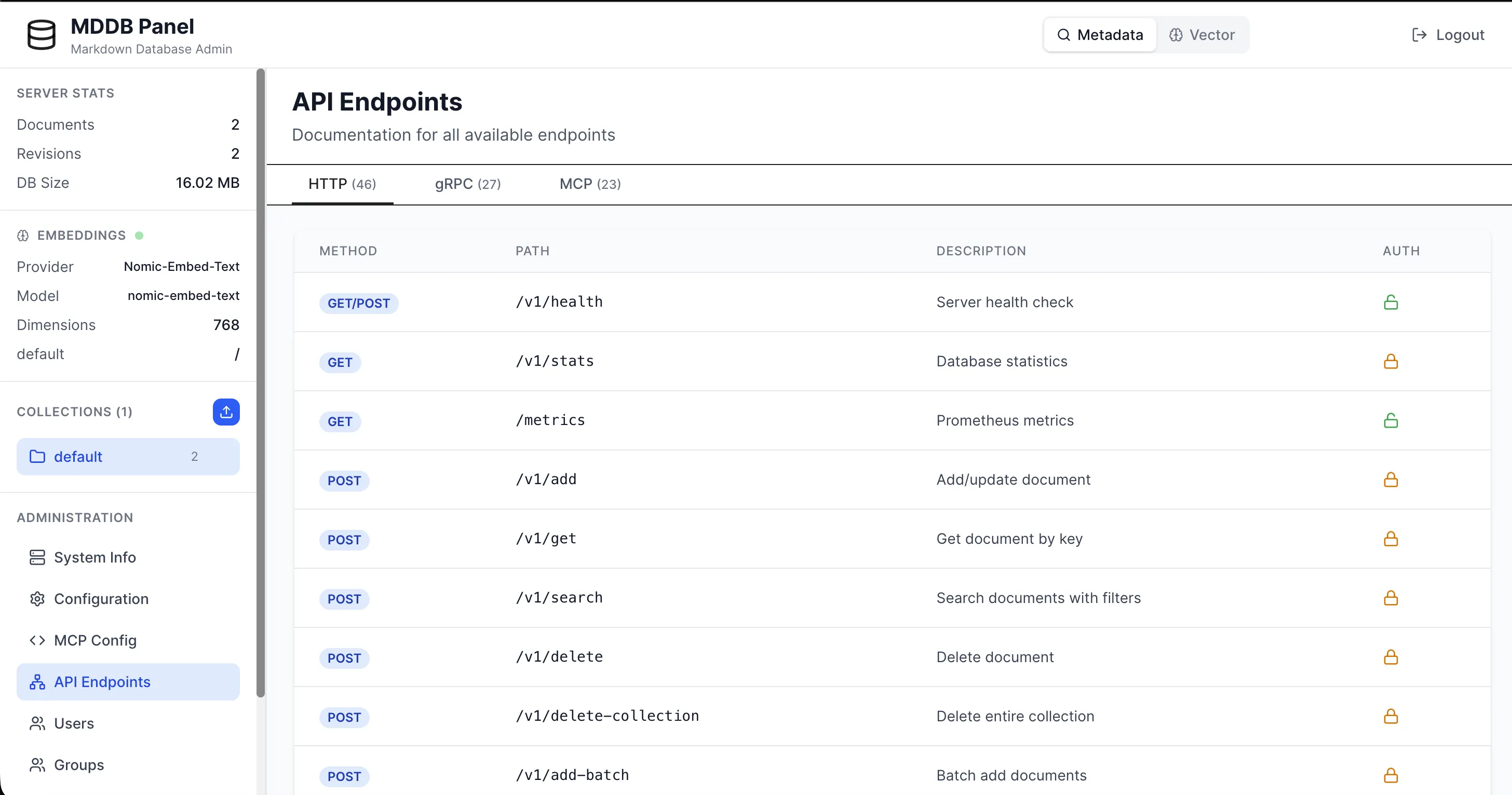
A React panel for documents, users and search. It talks to the server over REST or GraphQL, and you can switch between the two.
Quick Start #
# Run MDDB server
docker run -d \
  -p 11023:11023 \
  -p 11024:11024 \
  -v mddb-data:/app/data \
  tradik/mddb:latest

# Test the API
curl http://localhost:11023/health# Clone repository
git clone https://github.com/tradik/mddb.git
cd mddb
# Start the server, the web panel and the chat server
docker compose up -d
# Services available (bound to 127.0.0.1):
# - MDDB HTTP: http://localhost:11023
# - MDDB gRPC: localhost:11024
# - MCP (HTTP): http://localhost:9000/mcp
# - Web Panel: http://localhost:3000
# - Chat: ws://localhost:11030/ws# Download binary
wget https://github.com/tradik/mddb/releases/download/v2.19.13/mddbd-v2.19.13-linux-amd64.tar.gz
tar -xzf mddbd-v2.19.13-linux-amd64.tar.gz
# Run server
./mddbd-v2.19.13-linux-amd64/mddbd
# Server starts on http://localhost:11023# Clone repository
git clone https://github.com/tradik/mddb.git
cd mddb
# Build (server and CLI)
make build
# Run
./services/mddbd/mddbdDownload #
Latest Release
Released: 22 November 2026
Package Managers
Docker All platforms
docker pull tradik/mddb:latest
docker pull tradik/mddb:2.19.13What's New in v2.19.13
- Automatic failover: with
MDDB_CLUSTER_PEERSand three or more nodes, the nodes elect a leader and replace a failed one. In tests a new leader took writes 2.6–3.7 s afterkill -9of the old one. - Collections across node groups:
MDDB_PLACEMENT_GROUPSsplits nodes into groups, each collection lives in one of them, and any node routes a request to the right group.POST /v1/placement/movemoves a collection without losing a write. - Vector indexes load from disk: 200,000 vectors with HNSW were ready in 4–10 s instead of 117 s, and IVF, PQ, OPQ and SQ no longer retrain at startup.
- Reranking: an optional model reorders the best candidates of a search. If it times out or fails, the search returns its own order.
- Tenant limits: quotas, rate limits and concurrency limits per tenant and per API key, with a Tenants page in the panel.
Documentation #
Getting Started
- Quick StartInstall, start and run a first search
- InstallationPackages, binaries, containers and building from source
- ConfigurationEvery environment variable and per-collection setting
- FeaturesWhat the server does, in one list
- API DocumentationInteractiveEvery endpoint, with a Try it console
- OpenAPI SpecMachine-readable API specification
- ExamplesCode examples and patterns
- Use CasesWhat people build with MDDB
- Docker GuideContainer deployment
- Docker Hub ImageTags, volumes and what ships in the image
- ArchitectureSystem design and internals
Search & AI
- Search AlgorithmsUpdatedFTS + vector, retrieval modes (parent/chunk/window), MMR diversification
- Vector QuantizationNewint8/int4 storage + disk-only low-memory mode
- PMISparseBM25 + PPMI query expansion (Tradik Limited)
- Reference CodingNewother projects' code as searchable references, with licences
- Code IntelligenceNewdefinitions, references and implementations, from gopls, basedpyright, phpactor, clangd or rust-analyzer
- GeosearchR-tree + geohash radius/bbox queries
- RAG PipelineWordPress → MDDB → LLM guide
- LLM ConnectionsClaude, ChatGPT, Ollama, DeepSeek, Manus, Bielik.ai
- Using MDDB from AI AgentsNewToolsets, autoindex, passages, code symbols, destructive-tool confirmation
- Corpus PacksNewBuild a collection once, install it read-only anywhere
- MCP Server ConfigAPI keys, rate limits, logging, access modes
- Custom MCP ToolsYAML-defined website-specific AI tools
- IntegrationsDocling, Langflow, OpenSearch pipelines
- Embedding ProvidersOpenAI-compatible, Ollama, Voyage, Cohere, or lexical with no model
- Zero-Shot ClassificationLabel documents against your own categories
- Bulk ImportFolders, archives and file conversion into a collection
- Work TrackingIssues, plan and progress notes kept next to the code
- MCP RevisionsStateless 2026-07-28 and handshake 2025-11-25 side by side
Security & Operations
- Multi-TenancyNewNamespace isolation per tenant across HTTP/gRPC/GraphQL/MCP
- Authentication & RBACJWT tokens, API keys, role-based access
- Auth Quick Start5-minute authentication setup
- TLS & mTLSHTTPS, client certificates, reloading certificates
- Security ControlsISO 27001 and SOC 2 control map, threat model, operator checklist
- Admin PanelThe web interface, page by page
- ReplicationLeader-follower, Docker Compose, monitoring
- ClusterLeader election, failover and collection placement
- DeploymentReverse proxies, systemd, Kubernetes, large databases
- Backup & RepairVerified backups, safe restores, repairing a damaged file
- Storage LayoutOne file or one file per collection, moving between them
- Storage TuningDisks, filesystems and settings that keep MDDB fast
- Telemetry & MonitoringPrometheus metrics, Grafana dashboards
- Health ChecksDocker & Kubernetes monitoring
- License AuditDependency license compliance (Trivy)
Model Training
- Making a Model FileWhat a GGUF file is, what tuning changes, and one worked example from a recipes collection
- Model Training ReferenceDataset formats, trainer profiles, trial runs, before/after evaluation, licences
Protocols & Advanced
- Elasticsearch SubsetNew_search, _count, _doc and _bulk under /es
- Qdrant Point Queryquery_points answered by MDDB vector search
- Open WebUI EnginesWeb search, reranker and document loader endpoints
- REST API GuideRequests and responses, endpoint by endpoint
- gRPC GuideProtobuf calls and streaming
- GraphQLSchema, queries, mutations and the playground
- Server-Sent EventsLive document changes over one HTTP stream
- Schema ValidationEnforce metadata structure per collection
- AutomationsTriggers, crons, webhooks, sentiment
- Temporal TrackingEvent history, hot-docs leaderboard, activity histograms
- Spell CorrectionSymSpell FTS corrections, custom dictionaries
- WordPress AI AgentBuild a chatbot for your WP site
- Chat WidgetEmbeddable AI chatbot powered by MDDB
- BenchmarkSearch algorithms measured: recall, latency, memory
- ComparisonMDDB next to other databases, with the measurements
- GuidesWebsite chat, WordPress analyzer, YouTube transcripts
Code Examples #
# Add document with TTL (expires in 1 hour)
curl -X POST http://localhost:11023/v1/add \
  -H "Content-Type: application/json" \
  -d '{
    "collection": "blog",
    "key": "hello-world",
    "lang": "en_US",
    "ttl": 3600,
    "meta": {
      "category": ["tutorial"],
      "author": ["John Doe"]
    },
    "contentMd": "# Hello World\n\nWelcome to MDDB!"
  }'

# Import directly from URL
curl -X POST http://localhost:11023/v1/import-url \
-d '{"collection":"docs", "url":"https://example.com/guide.md", "lang":"en_US"}'# Semantic search - flat (exact, default)
curl -X POST http://localhost:11023/v1/vector-search \
-H "Content-Type: application/json" \
-d '{
"collection": "kb",
"query": "how do I cancel my subscription?",
"topK": 5,
"threshold": 0.7,
"includeContent": true
}'
# HNSW - fast approximate nearest neighbor
curl -X POST http://localhost:11023/v1/vector-search \
-d '{"collection":"kb", "query":"refund", "topK":5, "algorithm":"hnsw"}'
# IVF - clustered search for large collections
curl -X POST http://localhost:11023/v1/vector-search \
-d '{"collection":"kb", "query":"refund", "topK":5, "algorithm":"ivf"}'
# PQ - compressed, memory-efficient search
curl -X POST http://localhost:11023/v1/vector-search \
-d '{"collection":"kb", "query":"refund", "topK":5, "algorithm":"pq"}'
# auto - the server picks the index per query: vector count, built indexes, filter
curl -X POST http://localhost:11023/v1/vector-search \
-d '{"collection":"kb", "query":"refund", "topK":5, "algorithm":"auto"}'# Simple search with BM25 scoring
curl -X POST http://localhost:11023/v1/fts \
-H "Content-Type: application/json" \
-d '{
"collection": "blog",
"query": "markdown database tutorial",
"limit": 10,
"algorithm": "bm25"
}'
# Boolean search (AND, OR, NOT, +required, -excluded)
curl -X POST http://localhost:11023/v1/fts \
-H "Content-Type: application/json" \
-d '{
"collection": "blog",
"query": "rust AND performance NOT garbage",
"mode": "boolean"
}'
# Phrase search — exact word sequence
curl -X POST http://localhost:11023/v1/fts \
-H "Content-Type: application/json" \
-d '{
"collection": "blog",
"query": "\"machine learning\"",
"mode": "phrase"
}'
# Proximity search — terms within 5 words
curl -X POST http://localhost:11023/v1/fts \
-H "Content-Type: application/json" \
-d '{
"collection": "blog",
"query": "\"database performance\"~5",
"mode": "proximity",
"distance": 5
}'curl -X POST http://localhost:11023/v1/search \
-H "Content-Type: application/json" \
-d '{
"collection": "blog",
"filterMeta": {
"category": ["tutorial"],
"status": ["published"]
},
"sort": "updatedAt",
"limit": 10
}'from mddb import MDDB
# TCP connection
db = MDDB.connect('localhost:11023', 'write').collection('kb')
# Unix Domain Socket (zero-network local transport)
# db = MDDB.connect('unix:/tmp/mddb.sock', 'write').collection('kb')
# Add document
db.add('faq', 'en_US', {'category': ['billing']}, '# Billing FAQ\n\nCancel in Settings.')
# Vector search (RAG pipeline step 1)
results = db.vector_search('how to cancel?', top_k=3, include_content=True)
# Full-text search
results = db.fts_search('billing refund', limit=10)
# Webhooks
db.register_webhook('https://app.com/hook', ['doc.added'], 'kb')
# Import from URL
db.import_url('https://example.com/docs.md', 'en_US')
# TTL
db.set_ttl('temp-key', 'en', 3600) # expires in 1h<?php
require_once 'mddb.php';
// TCP connection
$db = mddb::connect('localhost:11023', 'write');
// Unix Domain Socket
// $db = mddb::connect('unix:/tmp/mddb.sock', 'write');
// Add document
$db->collection('blog')->add('hello', 'en_US', ['category' => ['tutorial']], '# Hello');
// Vector search
$results = $db->collection('kb')->vectorSearch('cancel subscription', 5, 0.7, true);
// Full-text search
$results = $db->collection('blog')->ftsSearch('database tutorial', 10);
// Webhooks
$db->registerWebhook('https://app.com/hook', ['doc.added', 'doc.updated']);
// Import from URL
$db->collection('docs')->importUrl('https://example.com/post.md', 'en_US');
// TTL
$db->collection('cache')->setTtl('temp', 'en', 3600);# Docker (Easiest) - for Windsurf / Claude Desktop
# Configure ~/.windsurf/mcp.json:
{
"mcpServers": {
"mddb": {
"command": "docker",
"args": [
"run", "-i", "--rm", "--network", "host",
"-v", "mddb-data:/app/data",
"-e", "MDDB_MCP_STDIO=true",
"tradik/mddb:latest"
]
}
}
}
# stdio starts a separate local database; it does not connect to a running server.
# A running server - Claude Code (add the header when MCP API keys are on):
claude mcp add --transport http mddb https://mcp.example.com/mcp \
--header "X-API-Key: mcp_…"
# MCP provides 116 built-in tools including:
# - add_document, search_documents, semantic_search
# - full_text_search, hybrid_search, cross_search
# - classify_document, find_duplicates
# - geo_search, geo_within, geo_encode, geo_decode, geo_stats
# - automation, webhooks, schemas, backups
# - collection config, revisions, aggregate, and moreReplication and failover #
One leader takes the writes and streams its binlog over gRPC to read-only followers, so you add followers to serve more reads. With three or more nodes, the followers elect a new leader when the old one fails.