MDDB Automations
MDDB supports an automation system for reactive and scheduled workflows. Define webhook targets, create triggers that fire when documents match search criteria, and schedule periodic trigger execution with cron jobs. All three types are stored in a single automation BoltDB bucket and managed through a unified REST API.
Table of Contents #
- Overview
- Quick Start
- Configuration
- Data Model
- API Reference
- Webhook Payload
- Trigger Evaluation
- Cron Scheduling
- Panel UI
- Architecture
Overview #
The automation system has three rule types:
| Type | Purpose | Env Var |
|---|---|---|
| Webhook | Named HTTP endpoint target (URL, method, headers) | none: on with the automation system (MDDB_AUTOMATIONS, default enable) |
| Trigger | Fire a webhook when a new document matches a search query above a threshold | MDDB_TRIGGERS=true |
| Cron | Execute a trigger on a recurring schedule | MDDB_CRONS=true |
All three types share the same API endpoints and are distinguished by the type field. Triggers and crons each have their own switch; webhook targets run whenever a trigger or cron fires them.
How It Fits Together #
Document added to collection
        |
        v
  Trigger evaluates search query
        |
        v
  New doc in results AND score >= threshold?
        |
    yes |
        v
  Linked webhook fires HTTP request
Cron jobs add a time dimension: instead of reacting to new documents, they run a trigger's search on a schedule and fire the webhook for all matches above threshold.
Quick Start #
1. Create a Webhook #
Define where notifications should be sent:
curl -X POST http://localhost:11023/v1/automation \
  -H "Content-Type: application/json" \
  -d '{
    "type": "webhook",
    "name": "Slack Alert",
    "url": "https://hooks.slack.com/services/T00/B00/xxx",
    "method": "POST",
    "headers": {
      "Content-Type": "application/json"
    },
    "enabled": true
  }'
Save the returned id (e.g., wh_abc123).
2. Create a Trigger #
Define what search criteria should fire the webhook:
curl -X POST http://localhost:11023/v1/automation \
  -H "Content-Type: application/json" \
  -d '{
    "type": "trigger",
    "name": "AI Article Alert",
    "collection": "articles",
    "searchType": "fts",
    "query": "artificial intelligence machine learning",
    "threshold": 5,
    "webhookId": "wh_abc123",
    "enabled": true
  }'
Save the returned id (e.g., tr_def456).
3. Test the Trigger (Dry Run) #
Run the trigger's search without actually firing the webhook:
curl -X POST http://localhost:11023/v1/automation/tr_def456/test
This returns matching documents and their scores so you can verify the threshold before going live.
4. Add a Document to Fire the Trigger #
With MDDB_TRIGGERS=true, adding a matching document will evaluate all enabled triggers:
curl -X POST http://localhost:11023/v1/add \
  -H "Content-Type: application/json" \
  -d '{
    "collection": "articles",
    "key": "new-ai-breakthrough",
    "lang": "en_US",
    "contentMd": "# New AI Breakthrough\n\nResearchers have achieved a major advance in machine learning...",
    "meta": {
      "category": "technology",
      "tags": ["ai", "machine-learning"]
    }
  }'
If the new document appears in the trigger's search results with a BM25 score >= 5, the Slack webhook fires automatically.
Configuration #
Environment Variables #
| Variable | Default | Description |
|---|---|---|
MDDB_AUTOMATIONS |
enable |
disable turns the whole automation system off: webhook targets, triggers and crons. Webhook targets have no switch of their own; a trigger or cron fires them |
MDDB_TRIGGERS |
false |
Enable real-time trigger evaluation after document add |
MDDB_CRONS |
false |
Enable the cron scheduler for periodic trigger execution |
Triggers and crons are opt-in. You can create automation rules via the API regardless of these flags (unless MDDB_AUTOMATIONS=disable), but triggers and crons only execute when their flag is enabled.
Docker Example #
docker run -d \
  -p 11023:11023 \
  -e MDDB_TRIGGERS=true \
  -e MDDB_CRONS=true \
  -v /data:/data \
  tradik/mddb:latest
docker-compose.yml #
services:
  mddb:
    image: tradik/mddb:latest
    ports:
      - "11023:11023"
    volumes:
      - mddb-data:/data
    environment:
      MDDB_TRIGGERS: "true"
      MDDB_CRONS: "true"

volumes:
  mddb-data:
Data Model #
All automation rules are stored as AutomationRule in the automation BoltDB bucket. The type field determines which fields are relevant.
Common Fields #
| Field | Type | Description |
|---|---|---|
id |
string | Auto-generated unique identifier |
type |
string | "webhook", "trigger", or "cron" |
name |
string | Human-readable name |
enabled |
bool | Whether the rule is active |
createdAt |
int64 | Unix timestamp of creation |
updatedAt |
int64 | Unix timestamp of last update |
Webhook Fields #
| Field | Type | Default | Description |
|---|---|---|---|
url |
string | (required) | Target HTTP URL |
method |
string | "POST" |
HTTP method: POST, GET, or PUT |
headers |
map[string]string | {} |
Custom HTTP headers to include in the request |
Trigger Fields #
| Field | Type | Default | Description |
|---|---|---|---|
collection |
string | (required) | Collection to watch |
searchType |
string | (required) | Search method: "fts", "vector", or "hybrid" |
query |
string | (required) | Search query text |
threshold |
float64 | 0 |
Minimum score to fire (see Trigger Evaluation) |
webhookId |
string | (required) | ID of the webhook to fire |
searchParams |
object | {} |
Optional extra search parameters (e.g., alpha, strategy, algorithm) |
events |
string[] | all | Restrict to document events: "insert", "update", "delete" |
sentimentEnabled |
bool | false |
Additionally require the document's sentiment score to fall in range |
sentimentMin |
float64 | 0 |
Lower sentiment bound, -1.0 (negative) to 1.0 (positive) |
sentimentMax |
float64 | 0 |
Upper sentiment bound, -1.0 to 1.0 |
conditionLogic |
string | "and" |
How the search match and sentiment condition combine: "and" or "or" |
Sentiment-Conditioned Triggers #
Triggers can react to the tone of incoming documents using the built-in sentiment analyzer — no external service involved. For example, fire a webhook only for negative feedback:
{
  "type": "trigger",
  "name": "Negative feedback alert",
  "collection": "feedback",
  "searchType": "fts",
  "query": "delivery",
  "webhookId": "wh_abc123",
  "events": ["insert"],
  "sentimentEnabled": true,
  "sentimentMin": -1.0,
  "sentimentMax": -0.25,
  "conditionLogic": "and"
}
With conditionLogic: "and" both the search match and the sentiment range must
hold; with "or" either one fires the trigger. The computed score is included
in the webhook payload as sentimentScore.
Cron Fields #
| Field | Type | Default | Description |
|---|---|---|---|
schedule |
string | (required) | Cron expression (e.g., "0 9 * * *"), checked on create and update |
triggerId |
string | (required) | ID of the trigger to execute |
webhookId |
string | The webhook to fire; required unless backup or sync is set |
|
backup |
object | Take a backup instead of firing a webhook — see Scheduled Backups | |
sync |
object | Sync a sitemap, URL list or S3 prefix into a collection instead — see Synced Sources | |
lastRun |
int64 | 0 |
Unix timestamp of last execution |
nextRun |
int64 | 0 |
Unix timestamp of next scheduled execution |
API Reference #
All endpoints are under /v1/automation. Requests and responses use JSON.
List Rules #
GET /v1/automation
GET /v1/automation?type=webhook
GET /v1/automation?type=trigger
GET /v1/automation?type=cron
Returns all automation rules, optionally filtered by type.
# List all rules
curl http://localhost:11023/v1/automation

# List only webhooks
curl http://localhost:11023/v1/automation?type=webhook

# List only triggers
curl http://localhost:11023/v1/automation?type=trigger

# List only crons
curl http://localhost:11023/v1/automation?type=cron
Response:
[
  {
    "id": "wh_abc123",
    "type": "webhook",
    "name": "Slack Alert",
    "url": "https://hooks.slack.com/services/T00/B00/xxx",
    "method": "POST",
    "headers": {},
    "enabled": true,
    "createdAt": 1709510400,
    "updatedAt": 1709510400
  }
]
Create Rule #
POST /v1/automation
Create a new automation rule. The type field determines which fields are required.
Create a webhook:
curl -X POST http://localhost:11023/v1/automation \
  -H "Content-Type: application/json" \
  -d '{
    "type": "webhook",
    "name": "PagerDuty",
    "url": "https://events.pagerduty.com/v2/enqueue",
    "method": "POST",
    "headers": {
      "Content-Type": "application/json",
      "Authorization": "Token token=your-pd-token"
    },
    "enabled": true
  }'
Create a trigger (FTS):
curl -X POST http://localhost:11023/v1/automation \
  -H "Content-Type: application/json" \
  -d '{
    "type": "trigger",
    "name": "Security Alert",
    "collection": "incidents",
    "searchType": "fts",
    "query": "vulnerability CVE critical",
    "threshold": 3,
    "webhookId": "wh_abc123",
    "enabled": true
  }'
Create a trigger (vector):
curl -X POST http://localhost:11023/v1/automation \
  -H "Content-Type: application/json" \
  -d '{
    "type": "trigger",
    "name": "Similar Content Detector",
    "collection": "blog",
    "searchType": "vector",
    "query": "kubernetes deployment best practices",
    "threshold": 80,
    "webhookId": "wh_abc123",
    "enabled": true
  }'
Create a trigger (hybrid with extra params):
curl -X POST http://localhost:11023/v1/automation \
  -H "Content-Type: application/json" \
  -d '{
    "type": "trigger",
    "name": "Hybrid Alert",
    "collection": "docs",
    "searchType": "hybrid",
    "query": "breaking change API deprecation",
    "threshold": 60,
    "webhookId": "wh_abc123",
    "searchParams": {
      "strategy": "alpha",
      "alpha": 0.6,
      "algorithm": "bm25f"
    },
    "enabled": true
  }'
Create a cron:
curl -X POST http://localhost:11023/v1/automation \
  -H "Content-Type: application/json" \
  -d '{
    "type": "cron",
    "name": "Daily Security Scan",
    "schedule": "0 9 * * *",
    "triggerId": "tr_def456",
    "enabled": true
  }'
Get Rule #
GET /v1/automation/{id}
curl http://localhost:11023/v1/automation/wh_abc123
Update Rule #
PUT /v1/automation/{id}
Send the full updated rule body. Fields not included will be reset to defaults.
curl -X PUT http://localhost:11023/v1/automation/tr_def456 \
  -H "Content-Type: application/json" \
  -d '{
    "type": "trigger",
    "name": "Security Alert (updated)",
    "collection": "incidents",
    "searchType": "fts",
    "query": "vulnerability CVE critical zero-day",
    "threshold": 2,
    "webhookId": "wh_abc123",
    "enabled": true
  }'
Delete Rule #
DELETE /v1/automation/{id}
curl -X DELETE http://localhost:11023/v1/automation/tr_def456
Test Trigger (Dry Run) #
POST /v1/automation/{id}/test
Runs the trigger's search query and returns all matching documents with their scores. Does not fire the webhook. Only works on rules with type=trigger.
curl -X POST http://localhost:11023/v1/automation/tr_def456/test
Response:
{
  "trigger": {
    "id": "tr_def456",
    "name": "Security Alert"
  },
  "matches": [
    {
      "document": {
        "id": "doc1",
        "key": "cve-2026-1234",
        "contentMd": "# Critical CVE-2026-1234...",
        "meta": {"severity": "critical"}
      },
      "score": 8.2
    },
    {
      "document": {
        "id": "doc2",
        "key": "vuln-report-march",
        "contentMd": "# Vulnerability Report...",
        "meta": {"severity": "high"}
      },
      "score": 4.1
    }
  ],
  "total": 2,
  "threshold": 3
}
Webhook Payload #
When a trigger fires, MDDB sends an HTTP request to the linked webhook URL with the following JSON body:
{
  "event": "trigger.matched",
  "trigger": {
    "id": "tr_def456",
    "name": "Security Alert"
  },
  "collection": "incidents",
  "document": {
    "id": "doc1",
    "key": "cve-2026-1234",
    "lang": "en_US",
    "contentMd": "# Critical CVE-2026-1234...",
    "meta": {
      "severity": "critical",
      "tags": ["security", "cve"]
    }
  },
  "score": 8.2,
  "sentimentScore": -0.42,
  "timestamp": 1709510400
}
sentimentScore (−1.0…1.0) is present when the trigger has
sentimentEnabled: true.
Custom Headers #
Every webhook request includes these headers in addition to any custom headers defined on the webhook:
| Header | Description |
|---|---|
X-MDDB-Event |
Event type (e.g., trigger.matched) |
X-MDDB-Trigger-ID |
ID of the trigger that fired |
X-MDDB-Webhook-ID |
ID of the webhook being called |
Custom headers defined in the webhook's headers field are merged with these defaults. If a custom header collides with a built-in header, the custom value takes precedence.
Retry Backoff #
If the webhook endpoint returns a non-2xx status code or the request fails, MDDB retries with the following backoff schedule:
| Attempt | Delay |
|---|---|
| 1st | Immediate (0s) |
| 2nd | 1s |
| 3rd | 5s |
| 4th | 15s |
After the 4th failed attempt, the delivery is abandoned. Failed deliveries are logged but not persisted.
Trigger Evaluation #
Real-Time Triggers (MDDB_TRIGGERS=true) #
When a document is added to a collection, the following happens:
flowchart TD
    A[Document added to collection] --> B[Load all enabled triggers for this collection]
    B --> C{Any triggers?}
    C -->|No| D[Done]
    C -->|Yes| E[For each trigger: run search query]
    E --> F{New doc in results?}
    F -->|No| G[Skip]
    F -->|Yes| H{Score >= threshold?}
    H -->|No| G
    H -->|Yes| I[Fire linked webhook async]
    I --> J[Retry on failure]
    G --> K{More triggers?}
    J --> K
    K -->|Yes| E
    K -->|No| D
- All enabled triggers whose
collectionmatches the target collection are loaded. - Each trigger's search query runs using the configured
searchType(fts, vector, or hybrid). - If the newly added document appears in the search results and its score meets or exceeds the threshold, the linked webhook fires.
- Webhook firing is asynchronous and does not block the document add response.
Threshold Behavior #
The threshold field is interpreted differently depending on the search type:
| Search Type | Score Source | Threshold Scale | Example |
|---|---|---|---|
fts |
Raw BM25 score | Unbounded (typically 0-20+) | threshold: 5 means BM25 score >= 5 |
vector |
Cosine similarity x 100 | 0-100 | threshold: 80 means similarity >= 0.80 |
hybrid |
Combined score x 100 | 0-100 | threshold: 50 means combined score >= 0.50 |
Tips for setting thresholds:
- FTS: Use the
/testendpoint to see typical BM25 scores for your collection. Scores depend on document length, term frequency, and corpus size. Start with a low threshold (e.g., 2-5) and adjust upward. - Vector: 80+ indicates strong semantic similarity. 90+ is very strong. Start with 75 for broad matching or 85 for precise matching.
- Hybrid: Depends on the fusion strategy and alpha value. Use
/testto calibrate.
searchParams #
The optional searchParams field lets you pass additional parameters to the underlying search. These are forwarded directly to the search engine:
| Search Type | Supported searchParams |
|---|---|
fts |
algorithm ("bm25", "bm25f", "tfidf") |
vector |
algorithm ("flat", "hnsw", "ivf", "pq", "sq") |
hybrid |
strategy ("alpha", "rrf"), alpha, rrfK, algorithm, vectorAlgorithm |
Cron Scheduling #
How Crons Work #
When MDDB_CRONS=true, MDDB starts an internal cron scheduler (powered by robfig/cron/v3 with seconds support). Each enabled cron rule registers a job that:
- Runs the linked trigger's search query at the scheduled time.
- Checks all matching documents against the threshold (not just newly added ones).
- Fires the webhook once for each document that exceeds the threshold.
This is the key difference from real-time triggers: crons fire for all current matches, while real-time triggers only fire for the specific document that was just added.
Schedule Format #
MDDB uses the standard cron expression format with optional seconds support:
# Standard (5 fields): minute hour day-of-month month day-of-week
0 9 * * *          # Every day at 9:00 AM
*/15 * * * *       # Every 15 minutes
0 0 * * MON        # Every Monday at midnight

# With seconds (6 fields): second minute hour day-of-month month day-of-week
0 0 9 * * *        # Every day at 9:00:00 AM
*/30 * * * * *     # Every 30 seconds
0 0 */2 * * *      # Every 2 hours
Both forms run, and a schedule that does not parse is refused when the rule is created or updated.
Common Schedules #
| Expression | Description |
|---|---|
0 * * * * |
Every hour |
0 9 * * * |
Daily at 9:00 AM |
0 9 * * MON-FRI |
Weekdays at 9:00 AM |
0 0 1 * * |
First day of every month at midnight |
*/5 * * * * |
Every 5 minutes |
0 0 9 * * * |
Daily at 9:00 AM (with seconds field) |
Cron Lifecycle #
lastRunis updated to the current timestamp after each execution.nextRunis updated to the next scheduled execution time.- Disabling a cron (
enabled: false) removes it from the scheduler. Re-enabling re-registers it. - Deleting a cron removes it from the scheduler immediately.
Example: Daily Digest #
# 1. Create webhook pointing to your digest service
curl -X POST http://localhost:11023/v1/automation \
  -H "Content-Type: application/json" \
  -d '{
    "type": "webhook",
    "name": "Daily Digest Endpoint",
    "url": "https://api.example.com/digest",
    "method": "POST",
    "enabled": true
  }'
# Returns id: wh_digest

# 2. Create trigger for new content
curl -X POST http://localhost:11023/v1/automation \
  -H "Content-Type: application/json" \
  -d '{
    "type": "trigger",
    "name": "Popular Topics",
    "collection": "articles",
    "searchType": "vector",
    "query": "trending technology news",
    "threshold": 70,
    "webhookId": "wh_digest",
    "enabled": true
  }'
# Returns id: tr_popular

# 3. Schedule daily at 8:00 AM
curl -X POST http://localhost:11023/v1/automation \
  -H "Content-Type: application/json" \
  -d '{
    "type": "cron",
    "name": "Morning Digest",
    "schedule": "0 8 * * *",
    "triggerId": "tr_popular",
    "enabled": true
  }'
Scheduled Backups #
A cron rule can take a backup instead of firing a webhook: give
it a backup object and no webhookId (a rule with both is refused). The
same scheduler runs it, the same automation log records it, and each run is
a job on the SSE stream. mddb-cli backup schedule add|list|remove manages
these rules.
curl -X POST http://localhost:11023/v1/automation \
  -H "Content-Type: application/json" \
  -d '{
    "type": "cron",
    "name": "offsite nightly",
    "schedule": "0 3 * * *",
    "enabled": true,
    "backup": {
      "target": "s3",
      "bucket": "mddb-backups",
      "prefix": "prod-eu/",
      "keep": 7,
      "storageConfig": {"endpoint": "s3.eu-west-1.amazonaws.com", "region": "eu-west-1",
                        "accessKey": "AKIA...", "secretKey": "...", "useTLS": true}
    }
  }'
backup field |
Default | Description |
|---|---|---|
target |
local |
local (a directory inside MDDB_BACKUP_DIR) or s3 (any S3-compatible store) |
path |
local: the directory, relative to MDDB_BACKUP_DIR |
|
bucket |
storageConfig.bucket |
s3: the bucket |
prefix |
storageConfig.prefix, then mddb- |
start of every backup's name or key |
keep |
0 |
backups kept on the target; the oldest are deleted only after a new one is stored. 0 keeps all |
collections |
["*"] |
a subset needs MDDB_STORAGE_LAYOUT=per-collection |
storageConfig |
s3: endpoint, region, accessKey, secretKey, useTLS |
Reads (GET, list, and the rule returned by create and update) blank
storageConfig.secretKey and set secretKeySet: true; an update that sends
no secretKey keeps the stored one. An update that names neither a
webhookId nor a backup keeps the rule's backup, so a client can toggle
enabled without sending the backup back.
Over gRPC the same block is AutomationRuleProto.backup (25,
BackupActionProto), whose storage_config is the StorageConfigProto of
S3-backed collections: secret_key is write-only, reads set
secret_key_set. Validation and masking are the REST ones; see
GRPC.
A backup run's log entry has action: "backup", target (where the backup
is) and removed (what retention deleted). A failed run fires the
backup.failed webhook event, and /metrics carries
mddb_backup_last_success_timestamp{rule="<id>"}. The whole procedure —
verification, checksums, restoring from S3 — is in
BACKUP.
Synced Sources #
A cron rule can keep a collection in step with a source: give
it a sync object and neither webhookId nor backup (a cron rule takes
exactly one action). The same scheduler runs it and the same automation log
records it; each run is a job on the SSE stream and fires the
source.synced webhook event.
curl -X POST http://localhost:11023/v1/automation \
  -H "Content-Type: application/json" \
  -d '{
    "type": "cron",
    "name": "docs site",
    "schedule": "0 */6 * * *",
    "enabled": true,
    "sync": {
      "source": "sitemap",
      "url": "https://docs.example.com/sitemap.xml",
      "collection": "docs",
      "lang": "en",
      "prune": true
    }
  }'
sync field |
Default | Description |
|---|---|---|
source |
(required) | sitemap, urls, s3, git (2.19.5, see Git repositories) or issues (2.19.11, see Issues and pull requests) |
collection, lang |
(required) | where the documents go |
url |
sitemap: a sitemap or sitemap index, plain or gzipped; git, issues: the repository's https URL, or empty for the repository of a collection |
|
urls |
urls: the pages |
|
bucket |
storageConfig.bucket |
s3: the bucket. It must exist: a sync only reads it and never creates it |
prefix |
storageConfig.prefix |
s3: the objects synced are the keys under it |
storageConfig |
s3: endpoint, region, accessKey, secretKey, useTLS — the block S3-backed collections and backups use |
|
prune |
false |
delete the documents whose source is gone (no longer listed, or answering 404/410) |
maxDocuments |
1000 |
sources one run looks at, at most 50000 |
maxBytes |
10485760 |
bytes per fetched document, at most 100 MiB; a larger one fails, it is never cut |
What a run does. It lists the source (the sitemap's pages, the URL list, the objects under the prefix), then for each source, two at a time:
- Reads the validators the previous run left on its document.
- Fetches it only if it changed: a page with
If-None-Match/If-Modified-Since(a304is unchanged), an object only when its listed ETag differs. A source with no validators is downloaded and compared by sha256 — an unchanged hash writes nothing. - Converts it with the
/v1/uploadconverters: theContent-Typenames the format (HTML, Markdown, text, CSV, PDF), else the path's extension; PDF and the office formats are also recognised by content. Markdown frontmatter becomes metadata. A mailbox's messages and a file's images are not split out. - Writes it through the one write path, so schemas, collection quotas (507 past a limit) and a read-only collection apply as to any write.
Documents and keys. The key comes from the URL path or the object key
below the prefix: lower case, extension dropped, every other character run
one - (/blog/Post 1.html → blog-post-1, / → index). Two sources of
one run that derive the same key: the first keeps it, the rest fail. Each
document carries syncRule (the rule ID), syncSource (its URL or object
key), syncHash, and syncEtag / syncLastModified when the source sent
them. A sync never overwrites a document it did not write (one without its
syncRule), and a prune deletes only documents with its syncRule in the
rule's collection.
Safety and bounds. Every request goes through the SSRF guard: an
internal, loopback or link-local address is refused unless
MDDB_OUTBOUND_ALLOW_PRIVATE / MDDB_OUTBOUND_ALLOWLIST allow it. A
sitemap's pages and sitemaps must be on its own scheme and host; robots.txt
is honoured (the mddb group, else *; * and $ patterns; a site
without one sets no rules). Requests time out after 30 s and send
User-Agent: mddb; a sitemap may be 50 MB uncompressed and an index lists
at most 50 sitemaps per run. A listing cut at maxDocuments (or at 50
sitemaps), or one that lists nothing — a wrong prefix, a site in
maintenance — prunes nothing and ends the run with an error. A run of a
rule still going when the next is due is skipped and logged.
Watching it. A run's log entry has action: "sync", target (the
sitemap, N urls or s3://bucket/prefix) and sync: {added, updated, unchanged, deleted, failed}; status is error when the listing failed,
any source failed or a prune was withheld, with the first reasons in
error. The SSE job (sync-<ruleId>-<UTC stamp>) names the collection and
counts added, updated and failed. The source.synced webhook carries
{ruleId, ruleName, collection, source, added, updated, unchanged, deleted, failed}, plus error and errors when it failed.
Reads blank storageConfig.secretKey and set secretKeySet: true; an
update without a secretKey keeps the stored one, and an update naming no
action keeps the rule's sync. Over gRPC the block is
AutomationRuleProto.sync (26, SyncActionProto); over MCP it is the
sync argument of create_automation / update_automation.
Run now (2.19.0). Run now needs the cron scheduler: without
MDDB_CRONS=true it answers 503 "the cron scheduler is not running".
POST /v1/automation/{id}/run runs a cron rule's
sync — or its backup — at once, through the code its schedule fires: the
run is logged, announced on the jobs SSE stream and fires source.synced
(a backup: backup.failed when it fails), and it sets lastRun. A
disabled rule runs too, so a rule can be tried before it is enabled. The
answer is 202 with the run; the work goes on in the background:
curl -X POST http://localhost:11023/v1/automation/3f9c2a1b7d4e5f60/run
# {"ruleId":"3f9c2a1b7d4e5f60","action":"sync","status":"started",
#  "jobId":"sync-3f9c2a1b7d4e5f60-20261030T120000Z","startedAt":1793361600}
Follow jobId on GET /v1/jobs/stream?job=<jobId>. While the previous run
of the rule is still going the answer is 409 and the skip is logged, as a
scheduled skip is; 404 for no such rule, 400 for a rule with no sync or
backup, 503 when the server runs no cron scheduler (MDDB_CRONS off).
Over gRPC it is RunAutomation (Aborted while running, Unavailable
without a scheduler), over MCP run_automation, from the CLI
mddb-cli sync run <id>. It needs what editing the rule needs: a global
administrator.
The sources of a collection (2.19.0). GET /v1/automation?collection=docs
lists the rules acting on docs — the syncs writing to it and the triggers
watching it — and every sync and backup in a listing carries lastResult,
the newest automation log entry of the rule:
{
  "id": "3f9c2a1b7d4e5f60", "type": "cron", "schedule": "0 */6 * * *",
  "lastRun": 1793361600,
  "sync": {"source": "s3", "collection": "docs", "bucket": "kb", "prefix": "articles/",
           "storageConfig": {"endpoint": "s3.example.com", "accessKey": "AK", "secretKeySet": true}},
  "lastResult": {"at": 1793361600, "status": "error", "durationMs": 2140,
                 "error": "1 of 40 sources failed",
                 "added": 3, "updated": 1, "unchanged": 35, "deleted": 0, "failed": 1}
}
status is success, error or skipped; the secret is blanked as on
every read. lastResult is read from the log, never stored, so it is gone
once the log's retention (MDDB_AUTOMATION_LOGS_TTL) drops the entry. Over
gRPC: ListAutomationRequest.collection (2) and
AutomationRuleProto.last_result (27, AutomationRunResultProto); over MCP
the collection argument of list_automation; from the CLI
mddb-cli sync list --collection docs. Automations are global
administration: a tenant user is refused, so a listing never crosses
tenants.
Git repositories
Since 2.19.5 (#421) a sync can follow a git repository at a branch, a tag
or its latest release — a project's documentation, kept current release
after release without a job that clones it and runs mddb-cli autoindex:
curl -X POST http://localhost:11023/v1/automation \
  -H "Content-Type: application/json" \
  -d '{
    "type": "cron",
    "name": "project docs",
    "schedule": "0 4 * * *",
    "enabled": true,
    "sync": {
      "source": "git",
      "url": "https://github.com/example/project.git",
      "ref": "latest-release",
      "include": ["*.md"],
      "exclude": ["testdata/<strong>", "dist/</strong>"],
      "collection": "project-docs",
      "lang": "en",
      "prune": true
    }
  }'
sync field (git) |
Default | Description |
|---|---|---|
url |
the resolved repository | the repository over https, no credentials or query in it: https://github.com/owner/repo(.git); may be left to the repository of a collection (2.19.11) |
repositoryFrom |
the rule's collection | (2.19.11) the collection whose repository a rule without url reads |
ref |
the default branch | a branch (main), a tag (v1.2.0), a full ref (refs/heads/main), a commit id, or latest-release: the forge's latest release, else the highest v1.2.3 / 1.2.3 tag (pre-releases left out) |
include, exclude |
every file / none | globs over repository-relative paths, exactly as mddb-cli autoindex --include/--exclude: a glob matches the path or the file name, dir/** everything under dir |
forge |
known by host | github (GitHub Enterprise Server), gitlab, gitea or forgejo — needed for any host but github.com, gitlab.com and codeberg.org; an unknown host without it is refused with the list of what is supported |
tokenSecretRef |
the resolved one | a stored secret holding the token of a private repository; without it, the collection's or the host's default (2.19.11) |
hookSecretRef |
a stored secret that POST /v1/automation/{id}/hook verifies webhooks with; empty: no hook |
|
adopt |
false |
take over documents with the same key that no sync wrote — a collection seeded by mddb-cli autoindex |
maxDocuments bounds the files a run takes, maxBytes each file (a larger
one fails and is reported); the whole archive may be 1 GiB uncompressed.
How it is read, without git. The server has no git binary. It resolves
the ref from the ref advertisement of git's smart HTTP protocol
(GET <repo>.git/info/refs?service=git-upload-pack, an annotated tag
peeled to its commit), asks the forge's API for the latest release
(GitHub /repos/{o}/{r}/releases/latest, GitLab
/api/v4/projects/:id/releases, Gitea/Forgejo
/api/v1/repos/{o}/{r}/releases/latest), and downloads the forge's tar.gz
archive of the resolved commit (github.com's archive host for a public
repository, otherwise the forge's API). Every request goes through the SSRF
guard and a redirect may not leave https. The archive is streamed: only
regular files are read — symlinks, hard links and devices are skipped — a
path that is absolute or climbs out with .. fails the run before
anything is written, the forge's top directory (<repo>-<commit>/) is
dropped, and a file with a NUL byte in its first 8 KiB is left out as
binary unless it is a format the converters read (PDF, the office
formats).
Keys and meta as autoindex writes them. A document's key is the file's
repository-relative path (docs/API.md) — the key mddb-cli autoindex
gives it, so citations by key keep working and a collection seeded by
autoindex can switch to the rule. Markdown's frontmatter becomes meta; code
and other text are stored as they are, HTML, CSV, LaTeX, mail, RTF, PDF and
the office formats converted. Meta: path, extension, size,
modified, kind (doc, code with language, or text),
gitCommit, gitBranch (the resolved ref), and the sync's syncRule,
syncSource (the path), syncHash — the file's git blob id, what
git hash-object prints — plus syncRef and syncCommit, the ref and
commit the content was written at.
Incremental. When the ref resolves to the commit the last successful
run of the unchanged rule read, the run ends there: no archive is
downloaded, nothing is written, and the result says upToDate. Any change
to the rule's settings reads the archive again. Otherwise each file is
compared by blob id with the syncHash of its document and only what
changed is written; with prune, the documents of files that are gone are
deleted (a run cut at maxDocuments prunes nothing, as for every source).
Adopting a collection. Without adopt a document of the same key that
the rule did not write fails, as for every source. With adopt: true a
document that carries no syncRule (one autoindex wrote) is taken over —
rewritten with the sync's meta under the same key, so there is no
duplicate; a document another sync wrote is still never touched.
Credentials. A token is never stored in the rule: tokenSecretRef and
hookSecretRef name secrets of the write-only store the chat's MCP
servers use (PUT /v1/chat/mcp-secrets/{name} with {"value": "..."},
sealed with MDDB_ENCRYPTION_KEY; the secret's header is ignored here).
A rule naming a secret that does not exist is refused, and a secret a rule
names cannot be deleted (409, usedBy: ["automation:<rule>"]). The token
goes to git's smart HTTP as basic auth (x-access-token on GitHub,
oauth2 on GitLab, Gitea and Forgejo) and to the APIs as
Authorization: Bearer (Gitea and Forgejo: token). Reads return the
names, never a value.
Webhook. POST /v1/automation/{id}/hook runs the sync at once when a
forge reports a push or a release. The forge has no mddb credentials, so
this one route is open; the request proves itself against the
hookSecretRef secret instead: GitHub's X-Hub-Signature-256 (an
HMAC-SHA256 of the body, which Gitea and Forgejo send too), Gitea's
X-Gitea-Signature, Forgejo's X-Forgejo-Signature, or GitLab's
X-Gitlab-Token. Answers: 202 with the run (as Run now), 200 for
GitHub's ping, 401 for a missing or wrong signature, 404 for an id
without a hook, 409 while the previous run is going, 413 past 25 MB,
503 when the secret cannot be opened or no cron scheduler runs.
Point the forge's webhook at https://<mddb>/v1/automation/<id>/hook with
the secret's value and content type application/json.
What a run reports. lastResult and the automation log carry ref,
commit and upToDate next to the counts, lastResult also commitUrl
(the commit's page on the forge); the source.synced webhook carries
ref, commit and upToDate. Over gRPC the fields are
SyncActionProto 12–18 (ref, include, exclude, forge,
token_secret_ref, hook_secret_ref, adopt) and
AutomationRunResultProto 10–13 (ref, commit, commit_url,
up_to_date); over MCP the same names in the sync object.
Issues and pull requests
Since 2.19.11 (INT-023) a sync can mirror a forge repository's issues and pull requests (GitLab: merge requests) into a collection, read-only: one document per item, refreshed on a schedule, by the forge's webhook and on demand. mddbd never writes to the forge; create, comment and close there. Work Tracking for Agents shows how an agent uses it.
curl -X POST http://localhost:11023/v1/automation \
  -H "Content-Type: application/json" \
  -d '{
    "type": "cron", "name": "shop-api issues", "schedule": "*/15 * * * *", "enabled": true,
    "sync": {
      "source": "issues", "repositoryFrom": "shop-api",
      "collection": "shop-api-issues", "lang": "en",
      "state": "all", "include": ["issues", "pulls"], "comments": true,
      "hookSecretRef": "forge-hook"
    }
  }'
sync field (issues) |
Default | Description |
|---|---|---|
url |
the resolved repository | the repository over https, as for git; may be left to a collection's repository (below) |
repositoryFrom |
the rule's collection | the collection whose repository a rule without url reads |
forge |
known by host | as for git: github, gitlab, gitea or forgejo for a host other than github.com, gitlab.com and codeberg.org |
state |
all |
open, closed or all |
since |
none | only items updated on or after it: 2026-01-02 or an RFC 3339 time |
include |
["issues"] |
issues, pulls or both |
comments |
true |
append each comment to its item's document |
tokenSecretRef, hookSecretRef |
stored secrets, as for git; a public repository needs no token |
|
prune |
false |
delete the documents of items the forge no longer lists |
One document per item. Key issue-<number> or pull-<number>
(GitLab numbers issues and merge requests apart, so both can exist). The
content is Markdown: # <title>, the body, then one ## Comment by <login> on <YYYY-MM-DD> section per comment, oldest first, so a passage
points at the comment that matched; GitLab's system notes are left out.
Meta, flat for filters and aggregations: title, number, kind
(issue or pull), state (open or closed), stateReason
(merged for a merged pull request, else what GitHub sends:
completed, not_planned), labels, assignees, author,
milestone, createdAt, updatedAt, closedAt (RFC 3339, UTC),
comments (the forge's count), url, linkedIssues (numbers written
#123, and links to the repository's issues), linkedPulls (links to
its pull or merge requests, and GitLab's !123; on GitHub and Gitea, which
number both alike, a #123 may be either and is listed in
linkedIssues), paths (file paths the text names — a path with a
directory and an extension, or a file name whose extension the code index
knows — at most 50), and syncRule, syncSource (the item's page),
syncHash, syncEtag as for every source.
Incremental. The forge is asked for the items updated since the
newest one the last successful run of the unchanged rule read — a second
earlier, so an item changed in that second is not missed — oldest change
first (GitHub GET /repos/{o}/{r}/issues?since=…&sort=updated, GitLab
/projects/:id/issues and /merge_requests?updated_after=…, Gitea and
Forgejo /repos/{o}/{r}/issues?since=…), following the Link header's
next pages. Each listing page is sent back with the ETag the last run got
for it: an unchanged page answers 304 and lists nothing, so a run with
nothing new costs one request per page and writes nothing. An item whose
updatedAt is the one its document was written from is not fetched again;
any other is written with its comments (one more request per page of
comments). The cursor and the pages' ETags are kept in the run's automation
log entry (sync.cursor, sync.pages); a rule changed since, or a log
entry gone with MDDB_AUTOMATION_LOGS_TTL, lists everything again — which
writes only what differs.
Bounds. A run reads at most maxDocuments items. On GitHub and GitLab,
which list the oldest change first, the next run goes on where it stopped;
on Gitea and Forgejo, which list in an order of their own, a cut listing is
reported as an error, as for every source: raise maxDocuments.
Prune. Off by default: an item the forge no longer has (deleted, or
transferred to another repository) keeps its document. With prune: true
every run lists every item — a deletion only shows as an item no longer
listed — without conditional requests, and the documents of items not
listed are deleted, with the guards every source has: a listing that is
cut, empty, or met the rate limit deletes nothing. state: "open" with
prune mirrors the open items only: a closed one is deleted.
Rate limit. A 429, or a 403 that says no requests remain
(X-RateLimit-Remaining: 0, RateLimit-Remaining: 0 or Retry-After),
ends the run with status: error and a message that says when the limit
resets (from Retry-After, X-RateLimit-Reset or RateLimit-Reset);
nothing is deleted and the next run starts from the same cursor. Another
401 or 403 says the token cannot read the repository's issues.
Webhook. Point the forge's webhook at POST /v1/automation/{id}/hook,
verified exactly as for git, with the events for issues, issue comments
and pull requests (GitHub and Gitea: issues, issue_comment,
pull_request; GitLab: Issue, Note and Merge Request events). An event
about one item refreshes that one document — one request for the item and
one per page of its comments — and answers 200 with {ruleId, key, status, added, updated, unchanged, deleted} (status: "error" and
error when the forge refused); 409 while a run of the rule is going.
A refreshed item is rebuilt even when its updatedAt did not move: an
edited comment does not always move it. An event that names no item (a
push) runs an incremental pass, as for git.
On demand. POST /v1/sync/refresh with {"collection": "...", "number": 123} refreshes item 123 of every issues rule writing to the
collection, at once, and answers what it did; without number it starts
an incremental run of every sync rule writing to it (status: "started"
and the jobId). Each rule is refreshed at most once every 30 s; a rule
refreshed sooner answers status: "throttled" with retryAfter, and when
every rule is throttled the answer is 429 with Retry-After. Each run
in the answer carries lastRunAt, the start of the rule's last run before
this one. 404 when no sync rule writes to the collection. It is gated as
a write of the collection, not as administration, so a user with write
permission on the collection, or an MCP key limited to it, may call it;
it never runs a rule writing elsewhere. Over MCP it is sync_refresh
(toolset ingest).
curl -X POST http://localhost:11023/v1/sync/refresh -d '{"collection": "shop-api-issues", "number": 31}'
# {"collection":"shop-api-issues","number":31,"runs":[{"ruleId":"3f9c2a1b7d4e5f60","status":"done",
#  "lastRunAt":1795400000,"added":0,"updated":1,"unchanged":0,"deleted":0,"failed":0}]}
Over gRPC the fields are SyncActionProto 19–22 (state, since,
comments, repository_from) and include (13) holds the kinds; over MCP
the same names in the sync object.
The repository of a collection
Since 2.19.11 (INT-023) a collection can carry the repository it is read
from, so the link and the token are set once — on the code collection —
and every git or issues rule reading that repository leaves url and
tokenSecretRef empty:
curl -X PUT http://localhost:11023/v1/collection-config -d '{
  "collection": "shop-api",
  "repository": {"url": "https://github.com/acme/shop-api", "tokenSecretRef": "forge-token"}
}'
repository takes url (an https repository URL a sync could read, as
for git), forge (for a host not known by name) and tokenSecretRef (a
stored secret's name — never a token). A config write that does not name
repository keeps the stored one; "repository": {} removes it. A secret
it names must exist and cannot be deleted while it does (409, usedBy: ["collection:<name>"]). Over gRPC it is CollectionConfigProto.repository
(25) and SetCollectionConfigRequest.repository (24),
CollectionRepositoryProto.
Where a rule's repository comes from (git and issues):
| Taken from, first that is set | |
|---|---|
| url, forge | the rule's url (and forge) → the repository of the collection repositoryFrom names → the repository of the rule's own collection |
| token | the rule's tokenSecretRef → the tokenSecretRef of the collection the url came from → the default forge token of the url's host |
A rule with no url anywhere is refused when it is saved, with a message
that says where to set one, and a run whose repository has since been
removed fails with the same message. The resolution is made at every run,
so changing the collection's repository changes what its rules read. A rule
with its own url and tokenSecretRef behaves exactly as before 2.19.11.
Default forge tokens. A server-wide map from a host to a stored secret, for the repositories whose rule and collection name no token:
curl -X PUT http://localhost:11023/v1/forge-tokens -d '{"defaults": {"github.com": "github-token"}}'
curl http://localhost:11023/v1/forge-tokens     # {"defaults":{"github.com":"github-token"}}
A PUT replaces the whole map; a host is a lower-case host name with an
optional port (git.example.com:8443), and every secret must exist. Both
calls are administration. The map is kept with the stored secrets (backed
up and replicated with them), and a secret it names cannot be deleted
(409, usedBy: ["default:<host>"]).
A token stays on its host. A token is sent only to the forge of the
url it was resolved for: a default is used only when the repository URL's
host equals the registered host exactly (lower case, port included —
github.com does not match gitlab.com, github.com.evil.example or
api.github.com), and a collection's token only with that collection's
url. On the wire a request carries the token only when it goes to the
repository's own host or, for github.com, to api.github.com and
codeload.github.com, where github.com serves its API and archives; a
redirect to any other host drops the Authorization header.
Panel UI #
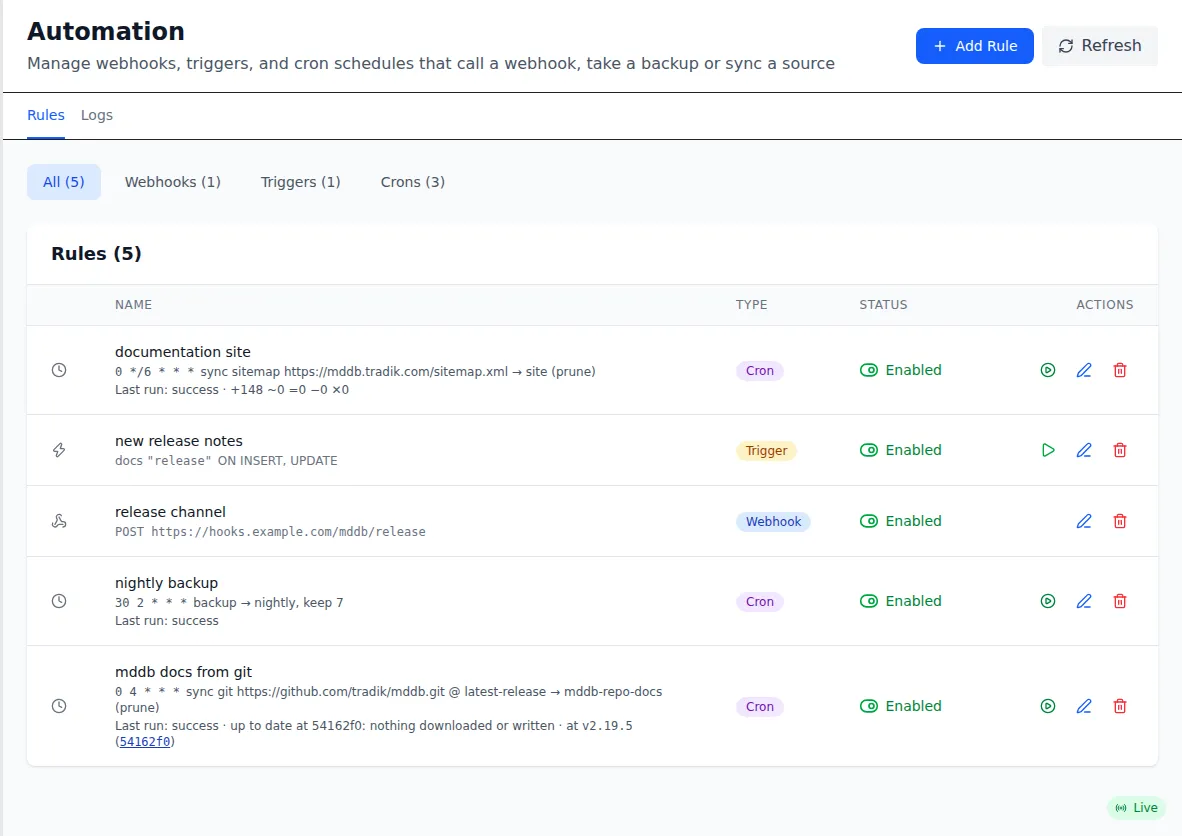
The MDDB Panel (React web UI) includes an Automations section under the Administration area. From the Panel you can:
-
List all webhooks, triggers, and crons with status badges (enabled/disabled).
-
Create new automation rules using a form-based UI with type selection.
-
Edit existing rules inline.
-
Delete rules with confirmation.
-
Test triggers with a single click, viewing matched documents and scores in a results table.
-
Toggle enabled/disabled state per rule.
-
View cron metadata including
lastRun,nextRun, and the human-readable schedule description. -
Choose a cron rule's action: call a webhook, take a scheduled backup (local directory or S3, retention
keep, collections) or sync a source (sitemap, URL list or S3 prefix,prune,maxDocuments, max MiB per document). A stored S3 secret is never shown: leave the field blank to keep it. -
Run a sync or backup now (2.19.0): the Run now button of a sync or backup rule starts it and shows the job id; the rule's row shows its last result (status, the sync's counts, the error).
-
Sync a git repository (2.19.5): Git repository as the source shows the repository URL, the ref (a branch, a tag or
latest-release, explained under the field), include and exclude globs (one per line), the forge (only for a host other than github.com, gitlab.com and codeberg.org), the token and webhook secrets — picked by name from the stored secrets, each marked set or not; their values are written in Chat → MCP secrets and never shown — and Adopt. A git rule's last result names the ref and the short commit, linked to the commit's page on the forge, and says plainly when the commit was the last run's: up to date … nothing downloaded or written.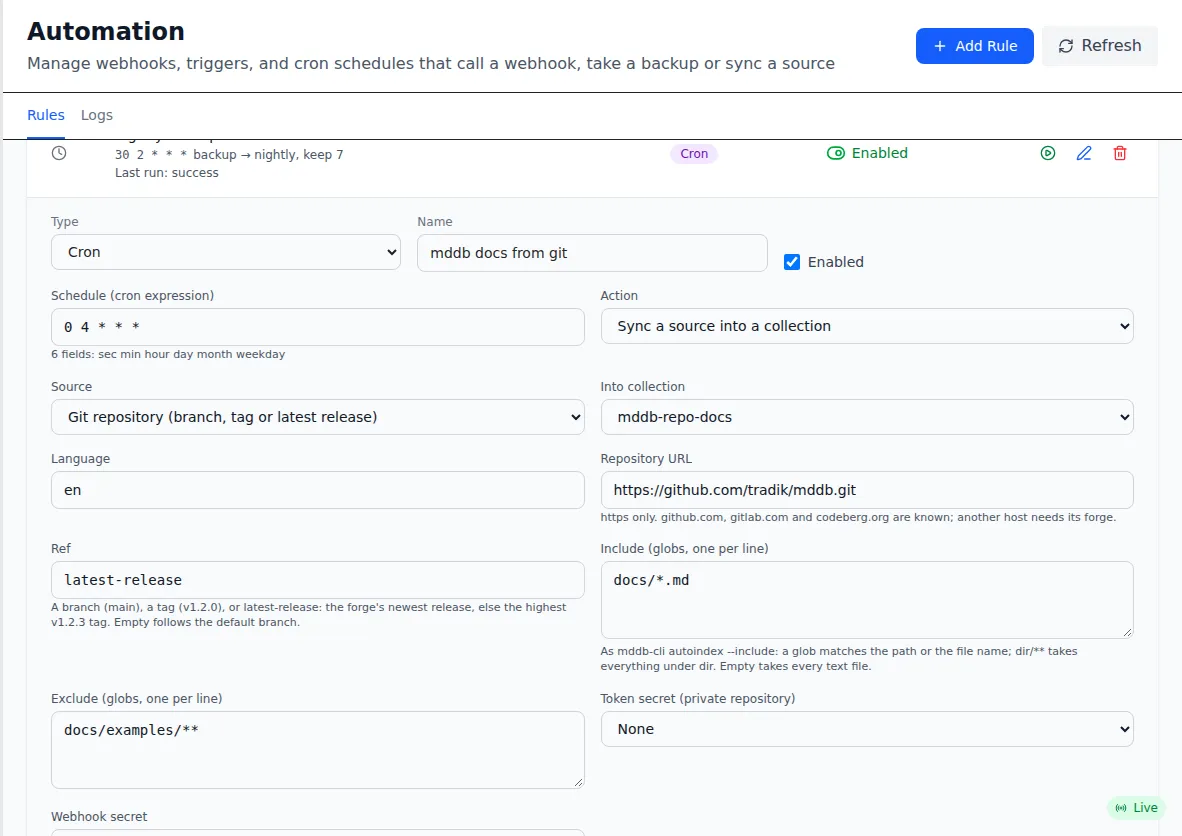
-
Read the log (Logs tab): rule type, status, HTTP status, and per run what it did — the webhook URL, the backup's target and how many old backups retention removed, or a sync's added / updated / unchanged / deleted / failed counts.
The Panel communicates with the same /v1/automation REST API documented above. No additional configuration is required.
Architecture #
How It Fits in mddbd #
graph TD
    subgraph mddbd
        API[HTTP API
/v1/automation/*]
        AS[Automation Store
BoltDB automation bucket]
        TE[Trigger Evaluator]
        WF[Webhook Firer]
        CS[Cron Scheduler
robfig/cron/v3]

        FTS[FTS Engine]
        VS[Vector Search]
        HS[Hybrid Search]
    end

    API --> AS

    DOC[POST /v1/add] --> TE
    TE --> AS
    TE --> FTS
    TE --> VS
    TE --> HS
    TE --> WF

    CS --> TE
    WF --> EXT[External HTTP Endpoints]
Storage #
All automation rules live in a single automation BoltDB bucket:
- Key format:
{id}(e.g.,wh_abc123,tr_def456,cr_ghi789) - Value: JSON-serialized
AutomationRulestruct - Indexing: Rules are loaded into memory on startup and kept in sync with the bucket on writes.
Trigger Evaluation Path #
When MDDB_TRIGGERS=true and a document is added via POST /v1/add:
- The document is persisted to BoltDB as normal.
- The FTS index and vector embeddings are updated.
- The trigger evaluator loads all enabled triggers for the document's collection.
- For each trigger, the search runs against the now-updated index.
- If the new document appears in results with score >= threshold, the webhook fires in a background goroutine.
- The
POST /v1/addresponse returns immediately without waiting for webhook delivery.
Cron Scheduler #
When MDDB_CRONS=true:
- On startup, all enabled cron rules are loaded from BoltDB.
- Each rule is registered with the
robfig/cron/v3scheduler. - At the scheduled time, the cron job invokes the trigger evaluator.
- Unlike real-time triggers, cron execution checks all documents in the collection, not just a newly added one.
- The webhook fires once per matching document above threshold.
lastRunandnextRunare updated in BoltDB.
Reliability #
- Webhook delivery uses retry with backoff: [0s, 1s, 5s, 15s].
- Trigger evaluation is non-blocking: it does not delay the document add response.
- Cron jobs are resilient to restarts:
nextRunis recalculated from the schedule expression on startup. - If the linked webhook or trigger has been deleted, the referencing rule is silently skipped.